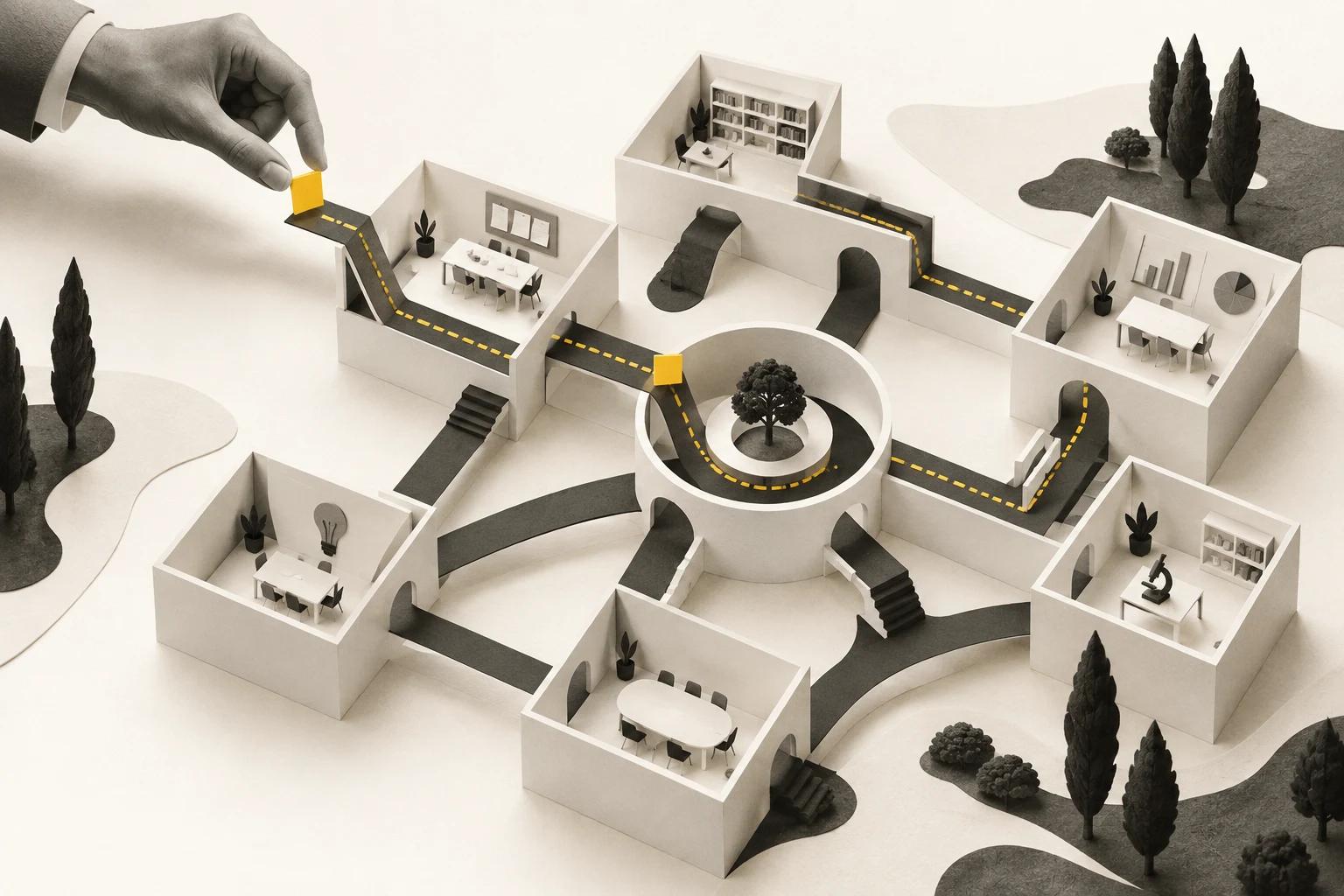
We all have AI. So why are some people getting so much more from it?
A look inside how we're building Scaled Memory—and using AI to change the way we work.
3 November 2026 · 25 minute read

TL;DR
- Most organisations we meet already have Copilot or Claude or ChatGPT. In practice, their use is often limited to searching across a few systems, asking questions of documents and creating a first draft in Word, PowerPoint or Excel. From an internal survey of customers, over 50% of clients were using Copilot, with ~75% naming change and adoption as a blocker. People have the tools but aren't trained to use them to their fullest.
- In our judgement, as much as 80% of knowledge work in well-bounded workflows could potentially be automated. That does not remove people. People decide what needs doing, give the AI the direction it needs and oversee its work. For lower-risk work, such as some social content, an end-to-end AI pipeline that automates all work can be appropriate. The more consequential the work, the stronger the controls and human decision-making need to be.
- A gap is emerging between people using AI for occasional tasks and those using agents to take on more of their work. Power users can delegate and review several pieces of work at once, while most people are still using AI to help with one task at a time. In OpenAI’s Codex research, fewer than 1% of active individual users had used Codex in the preceding 28 days, compared with 17.3% of organisational users; almost all active OpenAI staff used it weekly. Anthropic’s research also found that longer-tenured Claude users tended to tackle more complex work and collaborate more with AI, though the reasons are not yet clear. As these tools improve, the gap risks growing: organisations need to give more people the training, time and access to put AI to work across their own roles—not leave that opportunity to a small group of power users.
This article follows our own journey into that world: what we are automating, how we are building and checking it, and the tools we actually use.
What does “I use AI at work” actually mean?
For many people, using AI at work starts with a chat window. You ask Copilot to find something, give ChatGPT a document to summarise, or use an assistant to help draft a presentation. Most people’s expectations of what AI can do are based on what a free ChatGPT account or their current Microsoft Copilot can do. If that has been your experience so far, it may give you an incomplete picture of what AI can do.
Imagine finishing a client workshop. A team of people and agents gets to work. One agent maps the process from the conversation while another researches the gaps. A finance expert checks the process map, challenges the research and works with agents to develop a prototype. The team then reviews it and discusses the options with the client. Some agents wake up when something changes in our workspace; others are started by a person or called on by another agent. Meanwhile, our people can work across three or four activities at once, giving direction, reviewing what comes back and making decisions. That is the kind of working day we are building towards—and we’ll show you how it works.
In PwC's 2026 survey of 1,250 Australian workers, 59% said they had used AI at work, while 18% used generative AI daily. Plenty of people are still working out where it fits into their day—or whether they have the time, permission and support to use it at all.
A gap is emerging between most users and 'prosumers', or advanced adopters of AI. They are automating whole workflows - from software engineering to legal to marketing to finance to product development and management and more. In this world, AI agents are more like teammates that help parallelise whole aspects of workflows. Take a finance example, where one person could use multiple agents in parallel to:
- Run financial data ingestion and produce regular reports for verification
- Build bespoke reports and analysis on complex company questions, including PowerPoint presentations or advanced Excel analysis for the C-suite
- Automate manual steps around the systems used for the month-end cycle
- Build weekly or monthly finance dashboards and reports for executives and the board
The gap becomes visible in research on OpenAI's Codex, an AI tool originally built for software work that is increasingly used for business workflows too. In June 2026, fewer than 1% of active individual ChatGPT or Codex users in the study had used Codex in the previous 28 days. Among users on organisational plans, it was 17.3%. Inside OpenAI, almost all active staff used Codex weekly.
Those groups are not directly comparable: OpenAI's staff work unusually close to the technology, with extensive access and support. The figures also measure use, not productivity. But they give us a glimpse of how far apart working practices can be—even among people using tools from the same company.
This research points to a gap between power users and regular users of AI. We think that gap matters. As models rapidly improve, people with the time to experiment can move lower-risk workflows towards automation and take on more consequential work than before. The possibilities have moved quickly over the past year, but access to an AI tool alone will not teach a team how to use it. Organisations need to help their people build those skills.
People need time to practise, make mistakes with AI and hone their skills. They need clear guidance about what they can use and how to judge what comes back. They also need feedback from peers and leaders so they can keep learning and improving. Organisations need to make that support available beyond the few people who already have the confidence or time to experiment.
We've been on that journey ourselves. A year ago, I wrote about how AI tools were changing my personal productivity. Our world has changed completely since then. Let me show you what's changed, what that looks like today — and what we're still learning.
A year ago, we were writing about productivity hacks
In November 2025, I was focused on getting better at giving AI useful instructions, talking rather than typing, and using AI to automate parts of research and get to a first draft sooner. The tools I was using included:
- SuperWhisper for dictating emails, notes, prompts and early drafts.
- ChatGPT and other AI assistants for research, finding information, and drafting documents, proposals and briefings.
- Notion and Notion AI for meeting notes, projects, shared knowledge and everyday workflows.
- Gamma and Lovable for presentations and prototypes that people could react to.
- Codex CLI, Claude Code CLI and Cursor for exploring, building and refining software and small tools.

My 2025 productivity hacks (and what I’m testing for 2026) — AussieBytes Blog, November 2025.
The pattern at the time was to make AI a first stop in the work: speak the idea, give the tool context and instructions, then use the result as a starting point for human review. We were also experimenting with connector tools, custom assistants and local agentic systems, while using prototypes to have better conversations before investing in a full build.
November 2025 feels like a lifetime ago, but already at that time my personal productivity had changed substantially. I estimated that I was getting at least twice as much work through in a week. One data point I noted was that my company at the time had grown by 40%, while I felt I had kept pace with the additional work.
There were still limits. The models made mistakes, so a fast first draft needed a person to check the facts, framing and decisions. We were building some agentic workflows by hand, but turning them into repeatable, monitored processes was still ahead of us. Agents were so jagged and weak at jobs that we used heavy-handed skills and coding to build harnesses around the models’ weaknesses. As models improved quickly, we needed to strip this back or shift the harness as we pushed the models even further and found new gaps. At this time, we were also not comfortable with letting agents fully loose on enterprise systems: security, privacy and control needed more work. Prompt injection and other AI security risks were very real.
Today, we can give agents substantially more of the work: investigate a question across sources, work with files and tools, develop a design, write and test software, and prepare the results for review. We have agents in the cloud that can watch and wait for work, pick it up and return results into a human’s or another agent’s queue. We can run several workstreams in parallel, give agents reusable skills, and connect them to the knowledge and decisions they need. Agents now support work across customer service, website development, engineering, product operations, HR, finance, risk management, legal and more. We have seen swarms of agents work for up to a fortnight without stopping, completing in days work we estimate would have taken very large teams six to nine months. In our experience, we estimate our people are around 2–3 times more productive than a year ago, with high performers achieving 3–5 times the output. These are our own estimates.
With ambition, training and the right tooling, people and organisations can dramatically raise the bar on what's possible.
What a working day looks like now
The core tools
The tools on the desk
 OpenAI
 Anthropic
 Notion
 Google
 Cursor
 SuperWhisper
These are the AI tools that help us carry an idea from a conversation through research and design to something people can inspect. There are many great options in the market, and the space is moving incredibly fast. We often help clients select the right target tools, balancing productivity, safety and cost. These are the ones that made the most sense for our ecosystem. Alongside these, we have a broader catalogue of skills and agents that we bring to client work, covering areas such as delivery, engineering, finance, sales and marketing. We’ll touch on some of them here; you can explore the wider catalogue on our website.
For now, we’re leaving out hyperscaler AI platforms and enterprise integration and AI control planes. We’ll cover those in a future article.
| Category | Tools or systems | Tool type | What they are and how we use them |
|---|---|---|---|
| Voice | SuperWhisper | Third-party | A voice-to-text tool. We use it to speak ideas, instructions and feedback into our apps instead of typing. It can process speech locally, which helps with security and speed. |
| AI assistants | ChatGPT and Claude | Third-party | AI tools we can talk to and give tasks. We use them to think through problems, conduct research and build documents, software, reports and analysis. Over the past year, much of our work has shifted into agentic tools such as Codex and Claude Code, described below. |
| Agentic work and development | ChatGPT App / Codex | Third-party | AI tools that can work with files and other tools, act proactively and be automated. We use them for knowledge work, marketing, web design, software development, research, data analysis and more. |
| Documents and workspace | Google Drive and Notion | Third-party | Places to store files and organise work. We keep our official files in Drive and use Notion for notes, projects, knowledge and workflows. |
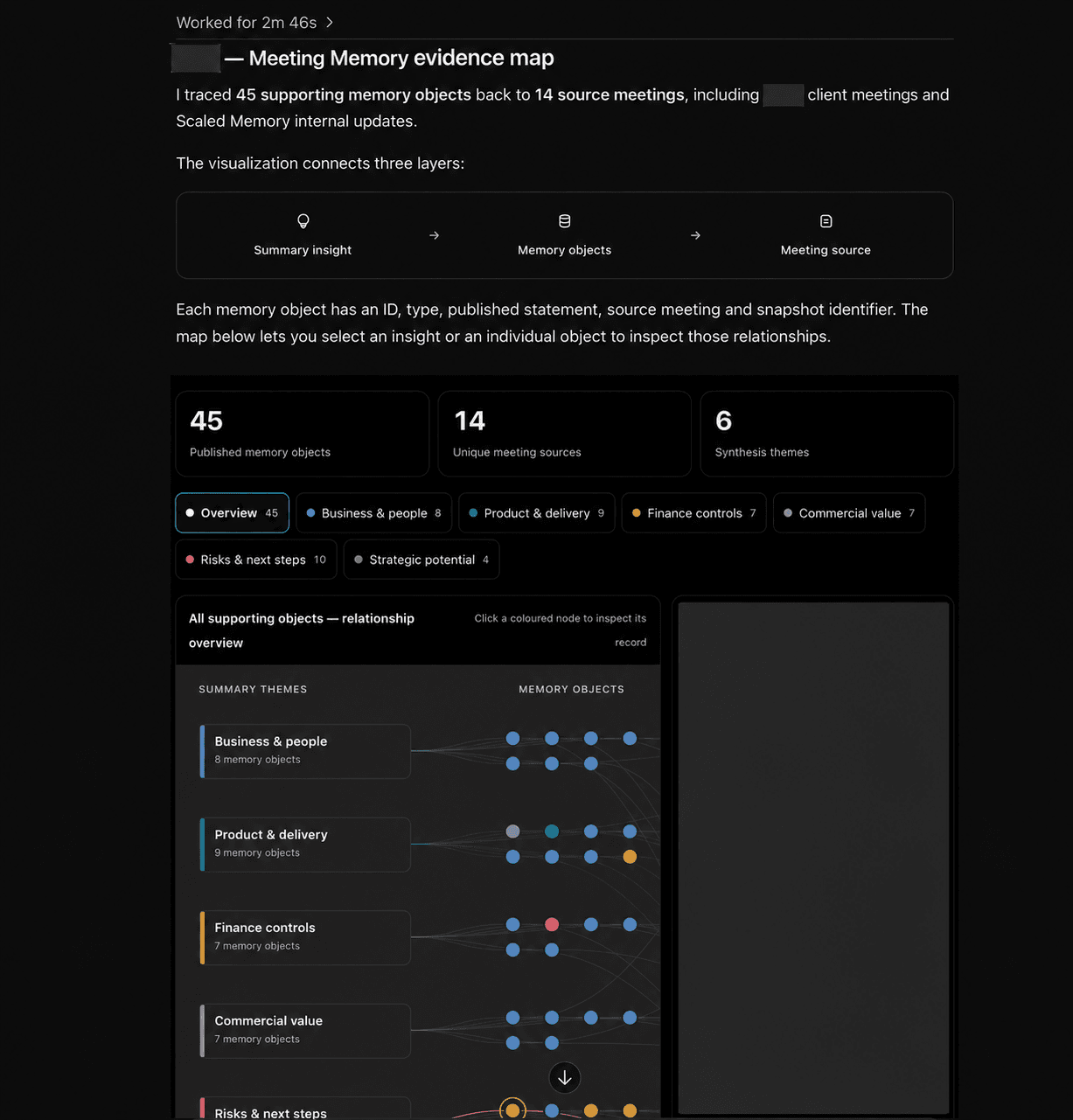
| Company memory | Meeting Memory |  | An advanced memory system that turns meeting information into searchable memory objects—not just stored transcripts. We use it to find facts, decisions, actions and assumptions linked to a client, project, department or other entity, and trace them back to the source. |
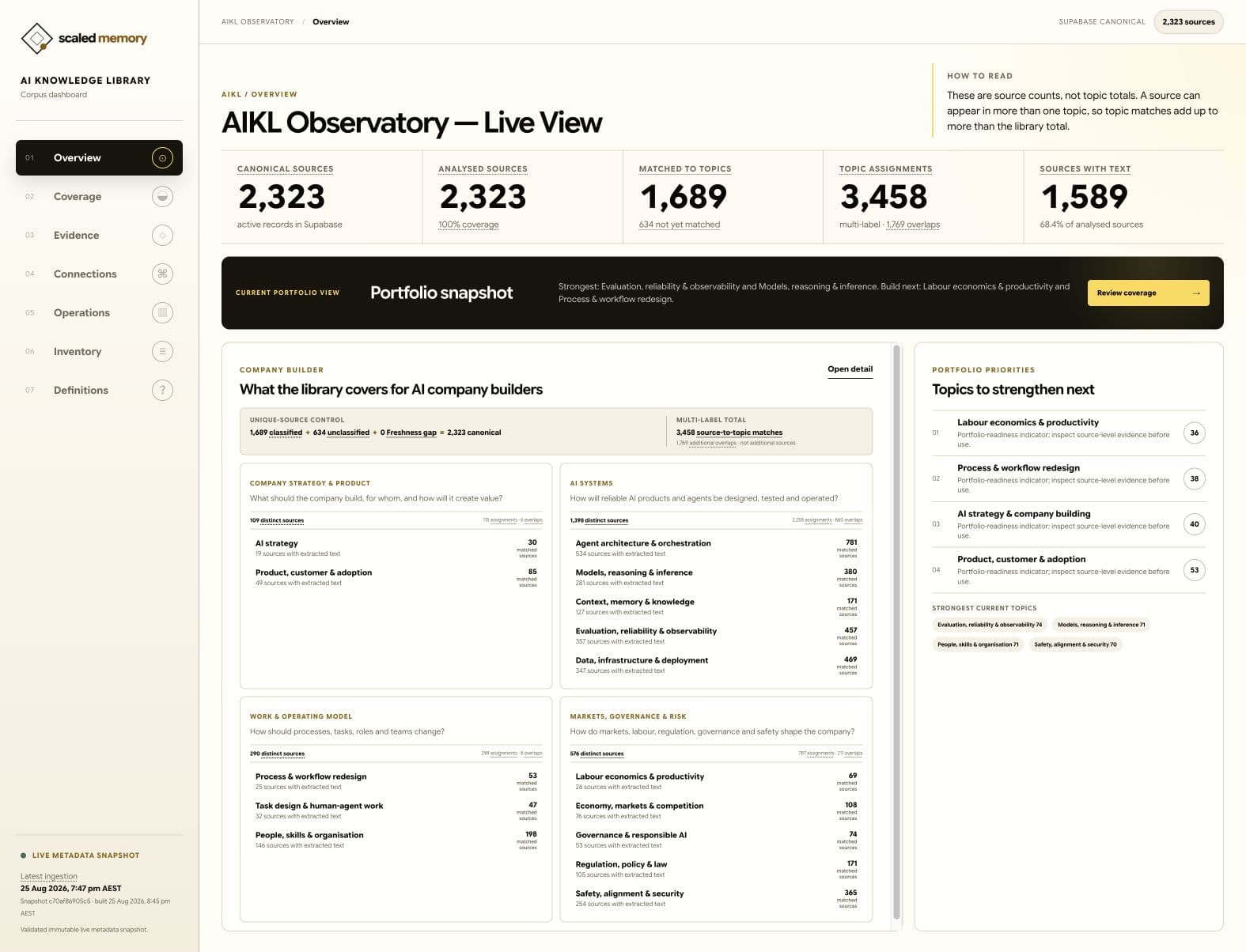
| Research knowledge | AI Knowledge Library (AIKL) | | Our proprietary knowledge base for advanced research on building AI-native companies. It covers concepts and relationships across economics, organisational design, transformation, engineering, risk and compliance, and a range of industries. We use it to find relevant evidence, explore how ideas connect and bring the right context to what we build for ourselves and our clients. |
| Research agent | Research Decision Agent (RDA) | | Our AI research agent, built to start with the knowledge we've already collected, investigate what we still need to know and bring the evidence together around a decision. It runs a highly governed workflow without hallucination that outperforms market-based products on our evals. We use it to explore questions and compare options with sources and reasoning we can inspect, rather than starting each piece of research from scratch; it is currently an internal prototype. |
| Governed consulting work | Consulting Operating System (Consulting OS) | | Our beta agentic system for organising consulting and large-scale delivery work. We use it to guide projects from sales through delivery, with defined workflows for problem and solution statements, prototyping, design, build, review and assurance, and controls for draft and final documents. It supports delivery across strategy, program management, process redesign, full-stack engineering, testing, deployment, quality review and more. |
| Business workflows | Skills (business workflows) | | Reusable instructions for AI to carry out particular kinds of work; we've developed an estimated 200+, grouped into plugins, with 18 plugins in our local marketplace catalogue. We use them across marketing, operations, finance, executive work, coding and development, although not every skill is deployed to everyone. Our skills change as new models are released. Last year, more of them compensated for model limitations; today, we use fewer, typically more advanced skills to define how we work or address the uneven capabilities of the latest models. |
| Creative workflows | Social and video agents, skills and brand guidance | and third-party | AI tools and instructions that support our creative work. We use them to develop social media ideas and execute creative workflows, from video creation and social media posting to SEO, website build and management, and more. They work alongside the creative people who lead the work. |
These tools overlap, and I don't expect everyone to need the same collection. The useful question is what each one can do with the information and authority we give it.
Explore our recommended toolkit
A voice dictation service
Use the dictation built into your AI tool or a dedicated app such as SuperWhisper or Wispr Flow. There are open-source alternatives if you aren't working in a stricter enterprise setting. We mostly use the built-in voice options in ChatGPT and Claude, with SuperWhisper for power users.
An AI agentic suite
Examples include Claude, ChatGPT and Microsoft Copilot. We use the ChatGPT app / Codex as our primary tools, plus Anthropic for API and certain agentic tasks.
For our use case, ChatGPT's desktop app has a range of benefits, although Claude is very close on this front:
- The simplest overall app for us, with an inbuilt browser and best-in-class computer use capabilities.
- Spaces (similar to Google Workspace apps), Sites (build and deploy your own web and database application in minutes), and Dots (your own personal assistant), alongside sharing and collaboration capabilities.
- A plugin ecosystem, an open-source CLI tool we can build on, and SDKs for developers, including the Responses API and Agents SDK.
Claude is great too, and we use both. Open-source harnesses have a huge amount to offer here—we use those too, including the DeepSeek harness and Pi—but they're less useful as an all-round tool for most people.
A document management suite
Examples include Microsoft, Google Workspace and Notion. We use Google Drive for canonical files, but Notion for almost everything else. For us, Notion replaces Jira, Confluence, ServiceNow, Workday or Google Workspace for many things, while overlapping significantly with OpenAI.
It offers an agentic ecosystem for automating knowledge work, supports models from multiple providers, integrates with coding harnesses, and has its own CLI and agentic capabilities. It's a power tool that avoids the need to pay for a host of SaaS solutions.
Coding harnesses, for developers and advanced business users
We use Codex plus Cursor, but Claude Code, Devin, Factory and VS Code are all great options too. For us, Codex and Cursor cover most use cases, and we can integrate other coding tools. We use a range of other specialist engineering tools depending on the platform, such as GitHub, Sentry, CodeRabbit and Datadog. We use a variety of in-house and external tools for code review, data analysis and other tasks, depending on the use case.
Your own skills and tools
We've built skills and tools around how we work and what makes Scaled Memory different. Your organisation's methods, knowledge and judgement are your secret sauce too—capture them in skills and tools you can develop and improve. Design them so you can change the underlying models and platforms as your needs change: the more of your know-how you can carry with you, the more freedom you have to choose your tools.
APIs and connections
APIs let software access capabilities in other services. We use them to access models and connect workflows. Model Context Protocol (MCP) is a standard way for AI tools to connect to other systems and use their information and capabilities. We also use MCP to connect our AI tools to one another and to systems such as Google Workspace (Drive, Gmail and Calendar), Notion, GitHub and Typefully. These connections give our tools access to the capabilities and context they need, with identity and permissions built in, so we don't have to paste everything into a chat.
A typical day and its workflows
Almost 90% of our prompting is spoken, not written. The only times I type these days are if 1) I am in a particularly public / noisy place and I can't whisper effectively and/or 2) I am writing an email / blog / thinking piece where slowing down and putting thoughts to paper matters. Taking the time to type is still important, and slowing down to work things through is vital, but for everything else - voice is the way to go. AI is great now at taking messy thoughts, conflicting ideas and turning them into action. The trick is to slow down and be logical and still follow best-practice prompting (a clear goal / objective, a clear definition of the outcome / done, clarity on what files / context to use, and any do's / don'ts).
Let's take a typical example of preparing a deliverable and how we do things at Scaled Memory.
In this scenario, we are holding an all-day client workshop to understand their finance processes. As it turns out, the client’s documentation is out of date, and they are walking us through their processes, systems and workbooks on screen. Our job is to clarify how we can use AI to make their world better, and to rapidly build and implement solutions for opportunities we collectively identify as having a return on investment.
Here’s how that work can move from a conversation to a solution, using the tools we’re building around our team.
Before the workshop: start with what we already know
By the time we sit down with a client, we’ve usually had several conversations during the sales and proposal process. Our meeting memory holds the context: what the client wants to change, what we’ve agreed and what still needs an answer.
When the sales process is complete, our agents automatically use that context to set up a Google Drive workspace, prepare the project plan and draft the problem statement, solution statement, interview guides and workshop material. The project lead reviews and refines the materials. Once approved, the agent can send the pre-read to the client.
During the workshop: listen and capture
Our people facilitate the discussion. An agent analyses the transcript as the session progresses and helps track where we are in the workshop. Afterwards, our memory system summarises actions, adds them to the project workspace in Notion and drafts the deliverables agreed during the session.
After the workshop: research, map and design in parallel
The delivery lead starts an orchestration agent. One sub-agent uses meeting memory, minutes and the recording to prepare descriptions, screenshots, process maps and canvas diagrams of the current workflow. Another uses our research agent to investigate relevant regulatory, legal and finance practices and assess the current process’s strengths and weaknesses, taking the client’s constraints and requirements into account.
A peer-review agent checks the work. Further agents develop target-state hypotheses, investigate solution options and, where appropriate, build prototypes. We often prefer a prototype as the starting point for a design conversation: people can react to something concrete, and the design can develop through iteration. For example, a client can look at the proposed workflow and ask: “Is that really how our team would handle an exception?” Their answer can change the design before we invest in the build.
Agree the opportunity and build
A deliverable agent brings the work together for our team to review. Where the client environment allows, we can present process maps, system diagrams and written explanations together in a web experience. We then discuss and agree the opportunity with the client, record the decisions and use agents to help design, build, test and deploy the solution. That might be a custom build or a configured solution on an existing tool, such as Salesforce or Workato.
Our people bring strategy, judgement, taste and the human experience. Our agents are their teammates: they can be a sounding board on any topic and take on the heavy lifting of doing almost all knowledge work. Our agents hand back to humans for review at all critical junctures.
For that to work, we need to know when an agent has done a good job—and when it needs help. We build controls and evaluations into our workflows to test the work, check it against the standards we expect and catch problems before they carry through to the next step. Where an agent can’t reliably complete a task on its own, the workflow brings a person in to review, resolve the issue or make the decision. That lets us delegate more of the work with confidence, while keeping human judgement where it matters.
That judgement needs time and space. Our people need room to think through what they need, define the requirements and be clear about what a finished job looks like. They also need time to check the detail and the tools to verify that the work has been done well. Beyond client engagements, they need room to experiment and keep finding ways the technology can make their own day—and their clients’ day—better.
That doesn't mean we need fewer people in our organisation - on the contrary - we can be more ambitious and empower our people to do more, and create more value for our clients and for our company. People now focus on the things they are uniquely good at, and delegate to their agents for the heavy lifting.
How reducing time to first draft was the secret
In last year’s article, I wrote about getting to a first draft faster. That idea still drives how we work, but today a first draft can be much more than a Word document. It might be a research brief, a set of questions for a client, an architecture, a presentation, a prototype, a financial analysis, a security review, an animation, a company or social marketing video, or a working piece of software.
The gain is that we can get to something concrete sooner. We can go from an idea to a draft in minutes or hours. Twelve months ago, much of this was not possible. Where it was, the first draft was OK but required days or weeks of iteration. Today, with our harnesses, tooling and the latest models, we estimate that a first draft for most of the work above is usually 90% of the way there, based on our experience. Iteration is still required to finish the work, but we typically use it to raise the bar. We still spend hours or days iterating, often to improve the solution we are building and create more benefits, whether through automating more, reducing compliance, regulatory, legal or security risk, improving the experience or driving revenue.
Time to first draft was really the secret and our first step. From that first step, we gained outputs and data about what worked and what didn’t, which we used to build feedback loops.
This year, evaluations and feedback loops have become a big part of how we work. A loop takes a result or lesson from one action and feeds it into the next, so an agent can check and improve its work as it goes. We have spent a lot of time capturing logs, traces and outputs, building evaluations we can learn from, and creating loops agents can use to iterate. That has helped us delegate longer-running tasks to agents on our behalf. From there, we have moved to multi-agent workflows. We’ll have more to say about this in the future.
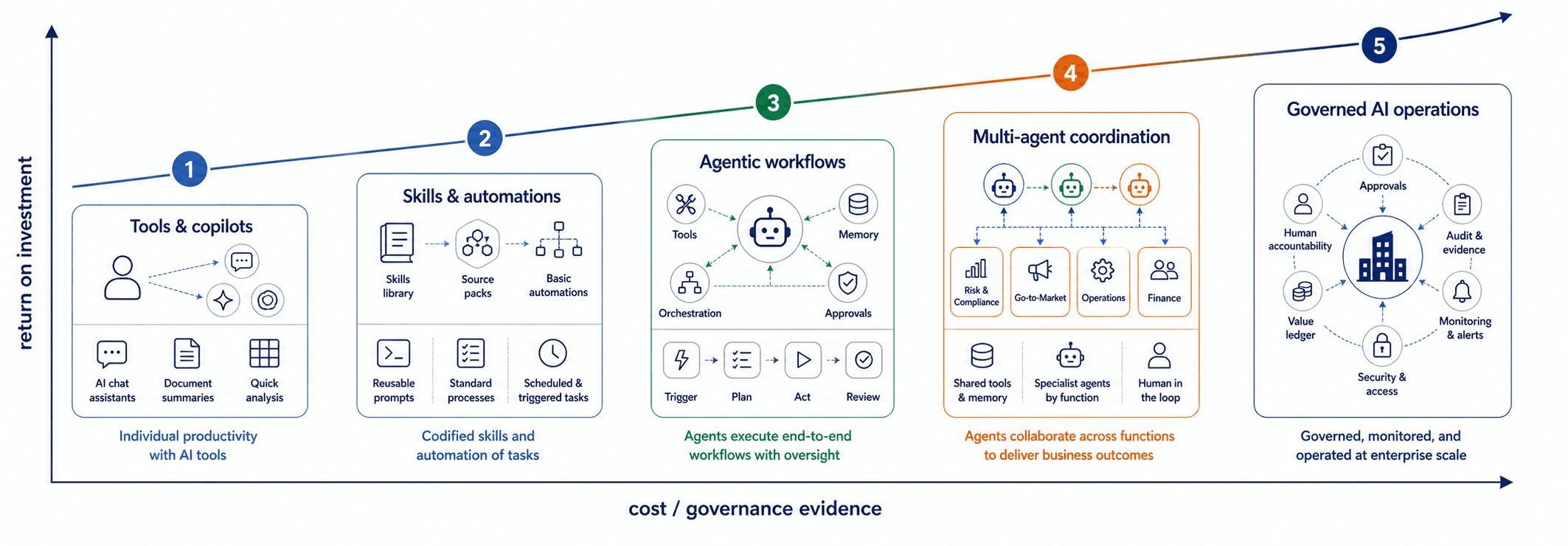
The good, the bad and the ugly of building an AI-native company
The good
The real benefit of AI is the range of work we can now attempt. People can do more and reach far beyond a traditional role brief. Research, consulting, software, social content and video are all part of building and running a company, and AI can help us accelerate what we do. A meeting can inform research; research can inform a design; the design can become a prototype people can inspect. Prototypes and implemented solutions can become blogs and social media content. We can put smaller teams around a bigger set of questions and be more ambitious about the solutions they create and the impact they can have.
The bad
AI brings a new and different set of challenges. AI can hallucinate. Getting an answer and getting the right answer are different jobs. AI swarms (many agents working in parallel) can create an enormous amount of text and analysis. How can a user properly assess the work? How can a line manager be sure how much checking and quality control has been done? That’s why we are building our AI capabilities in reusable blocks, developing harnesses and robust agents step by step for the work that matters, ensuring quality control and reusability for other agents and people.
The ugly
The ugly is what happens when AI gets it wrong. An agent can work from an old source, confidently report a partial job as complete, or pass an unexamined assumption into the next stage. Several agents can do that in parallel. Unwinding a bad response from a single agent turn is one thing. Unwinding a swarm of agents following a 24-hour run is another. We have also spent time building instructions and scaffolding around model weaknesses, only to find that newer models needed a different approach. Sometimes the right improvement is to remove machinery we no longer need.
Skills are a great example of this. Skills are a powerful tool for documenting your standard operating procedure for how agents should work on the workflows you care about. Six months ago (e.g. GPT 5.2 era, Claude Sonnet 5) - agents needed a lot more scaffolding and numerous (and sometimes large) skills were required to scaffold around an agent’s weaknesses. Six months on - we are now at GPT 6.1 era / Claude Opus 5.5 and agents are very different. They have been trained on simulated environments of all kinds, including enterprise systems and tasks - meaning models can now handle a new set of advanced workflows without the skills they once needed. In fact - skills from six months ago can actively harm your model and cause it to break and do unexpected things. We have spent some time pruning / simplifying skills for the latest models, whilst also building new skills as new capabilities have emerged. We expect this sort of work to be a theme for some time.
The secret? Evaluations. Good evaluations are the secret sauce to building an AI-native company. Models love verifiable rewards, and building evals that help your AI understand when it's doing a good or bad job across your engineering, operations, finance and HR workflows is key.
Evaluations are how you know an agent workflow actually delivers. They are how you can test whether the next model (whether a more intelligent and / or cheaper model) is worth implementing. Keeping a private dataset for your AI workflows is key to running successful evaluations.
What we wish we’d known before we started
I would start by picking a piece of work that happens often enough to learn from and matters enough to improve. Work out what a good result looks like, what information is needed, and where someone needs to make a decision. Then try it with AI, review the result and use what you learn to improve the next run.
Build an evaluation set as soon as possible. Evaluations can take time to get right - but the skill of learning what to measure and how to test is key to building enterprise-grade workflows.
Experiment as much as possible. This is a two-way street. Experimentation where people are not trained is a waste of time and money. But training your people and investing time and money for them to push new AI workflows is where the learning happens. New patterns emerge when we give them room to solve problems, make mistakes and spend some credits on experiments that may not pay off. Allowing as much time as possible for R&D each week is where we've seen the greatest gains overall.
Build reusable foundations before tying everything into an end-to-end workflow. For us, that means creating capabilities such as memory, research and governed workflows that can be used across many different tasks. We are still at the start of the AI journey. AI models and harnesses are evolving rapidly, month by month. In the midst of such rapid change, care needs to be taken with what to build on top of these platforms. Here are a few questions that can help:
- Where will models be in six months?
- Where will harnesses be in six months?
- Will the solution we’re building be improved or replaced by the models and harnesses coming in the next few months?
We have found that betting on the right primitives / building blocks is key. If you are building anything agentic - will your solution be better off or worse off as AI / harnesses improve quickly? If the answer is - 'better off' - then it's usually a winner. That's why we focused on memory, research agents, engineering / consulting agentic workflows, and reporting/presentation tools as our first building blocks. Regardless of the AI model or harness, we expect our tools will be more useful as these enablers improve.
Not all AI innovation needs to come from the top. Much of it can be discovered by teams looking for the low-hanging fruit in their day-to-day work. Once you have something that works, make it easier for the next person to use. There's a time in the early days to let each user build their own things, but the real leverage comes when many team members and agents can use and scale what works, not just the individual who built it. So when a user discovers a pattern that might work, and it's robust - scale it. This could be turning it into a governed skill. For a larger workflow, it might be creating an agent workflow which connects to a trusted source, a reusable skill, an evaluation and an explicit approval step. That’s how an improvement discovered by one person becomes a better way of working for the whole team.
Memory in reusable tools opens up new opportunities. Recently, we used our meeting memory system to look across conversations with clients and prospects, identify recurring themes and build a field-insights report—without asking people to complete a survey. The report mapped organisations by AI maturity and buying signal, and brought together recurring themes around use cases, tools, barriers and the kinds of support organisations were looking for. It presented the findings in charts and visual summaries, with the underlying conversations available to inspect.
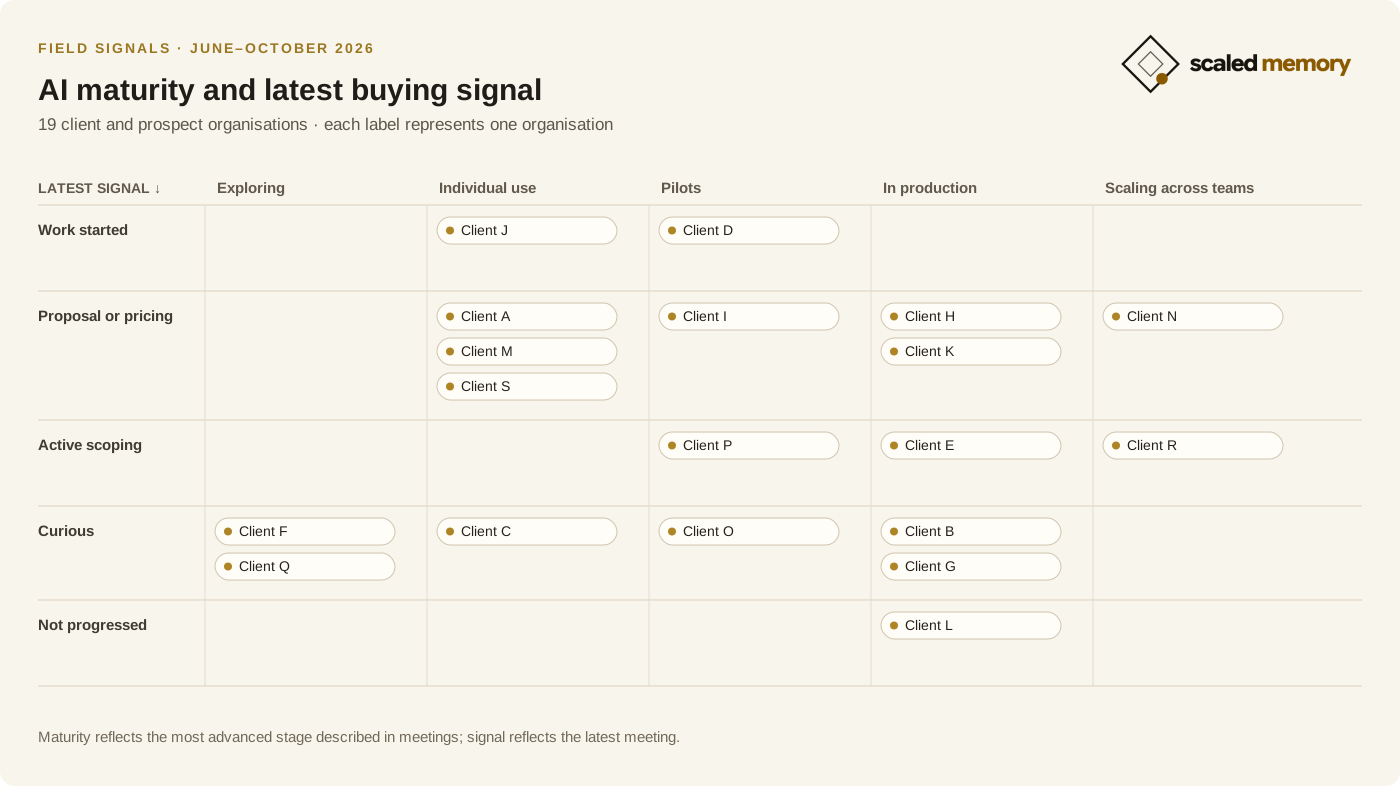
That’s one reason our working day looks different. Our team can draw on our core systems, agents and organisational memory to do more and work better. We believe owning that memory makes it easier to build useful agents and gives organisations more freedom to choose their tools.
For more on how we're building AI-native companies and memory, reach out to us here.
Publication notes and original links
By Derek Sheerin. First published on 3 November 2026 in Handwritten, Scaled Memory’s journal.
About Derek Sheerin
Derek writes about helping people and organisations succeed with AI, from strategy and governance to building agents, redesigning work and managing cyber security and risk.
Connect with Derek on LinkedInWant to talk about how this applies to your organisation?
Tell us about the work you want to improve.
Continue reading
More from Handwritten